Guide
One screen. Three questions.
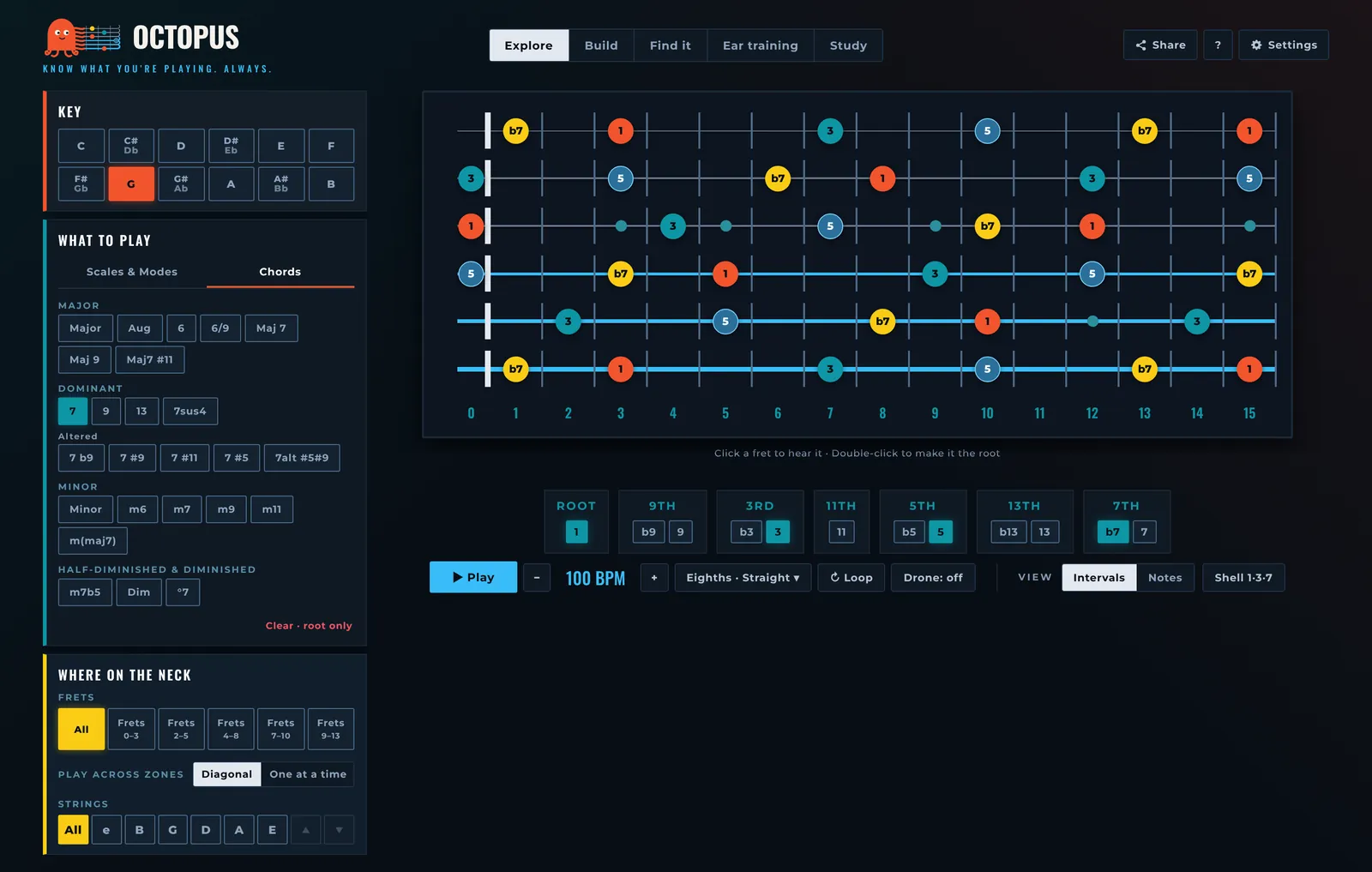
Which key, what to play, where on the neck. The column on the left answers them; the neck shows the result; the bar under the neck plays it. Here is what every part does.
- 1
Modes
The five ways to use the neck. Explore is the free neck. Build, Find it and Ear training are exercises. Study is a clean, full-width neck for playing along.
- 2
Share, help and Settings
Share copies a link to this exact neck: key, scale or chord, frets and strings. ? explains the colours and every degree. Settings holds what you choose once: note names (C D E or Do Re Mi), sound (Jazz, Nylon, Synth), theme (Auto, Cream, Night), left-handed neck, metronome click and count-in. Octopus remembers them.
- 3
Key
The root, the note everything is measured from. Black keys show both names (C# and Db) until you pick one; then the button shows the spelling that fits what you play: Db major, G# minor.
- 4
What to play
Scales and modes on one tab, chords on the other, grouped by family: major, dominant, minor, half-diminished and diminished. Clear · root only leaves just the root, so you can build your own sound with the degree chips (7).
- 5
Where on the neck
Frets: the whole neck, or one of five 4–5 fret areas. Pick two neighbouring areas to play across them: Diagonal runs one line up the neck, One at a time plays each area in turn. Strings: keep only some strings, a pair or three, and follow the neck sideways; the arrows slide the set one string up or down.
- 6
The neck
Every note shows its degree over the root. Colour is the note's job: root coral, third teal, fifth blue with a ring, seventh yellow, tensions (9, 11, 13) outlined in violet. Click a fret to hear it; double-click it, or hold it on a phone, to make it the new root.
- 7
Degree chips
Switch single degrees on and off. Each group offers its versions: b9 or 9, b3 or 3, b5 or 5, b13 or 13, b7 or 7. Turn off the 5 and the 9 and you see only what defines the chord.
- 8
Play
Play runs the lit notes from the root to the root, lighting each one as it sounds, with real guitar samples. − / + change the tempo. The rhythm menu holds the tempo slider, the subdivision (eighths, triplets, 16ths) and the pattern (straight, 3rds, groups of 3 or 4, triads). Loop repeats. Drone holds the root (1) or root and fifth (1+5) under everything. On a computer the space bar plays and stops.
- 9
View
Intervals or Notes on the circles: degrees by default, note names when you want them. Shell 1·3·7 keeps only root, third and seventh across the whole neck.